Events
Events for the various components are viewable in the Events tab for an edge device. Components are: All, Auth, Integrations, DeviceHub, Device Management and Marketplace. You can filter Events list by component, severity and date range. You can enable Forward Events from here, allowing you to view the Device Events tab, generate alerts based on events. and view application real-time status.
Only events from the time this tab is enabled are captured on this pane. Events are not available prior to this time. You can view Device Events if Forward Events is enabled.
Refer to the following actions you can take on the Belden Horizon Data Manager User UI's Edge Devices Details Events tab. The Events List in the Events tab includes only the events for the edge device selected.
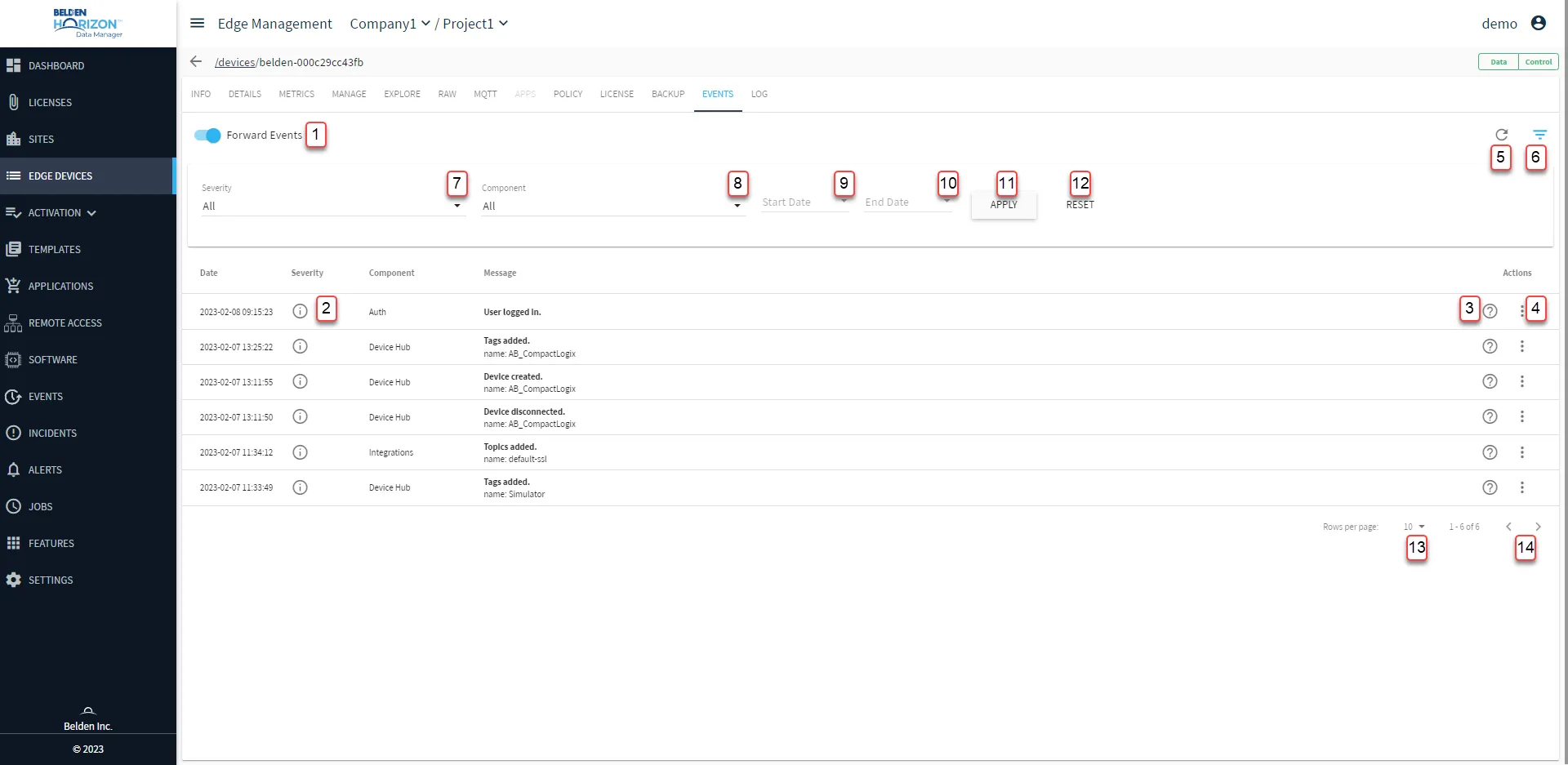
[1] Forward Events
[2] View Severity info
[3] View Message Info
[4] Action menu:
- Filter by Component
[5] Refresh
[6] Show filter / Hide filter
[7] Select Severity: All, Info, Warning, Alert, Error
[8] Select Component: All, auth - Auth, cc - Integrations, dh - Device Hub, dm - Device Management, mp - Marketplace
[9] Select Start Date
[10] Select End Date
[11] Apply
[12] Reset
[13] Select Rows per page: 10, 50, 100
[14] Forward/backward event records