1 min
This section covers email configurations settings for Belden Horizon Data Manager Admin Console.
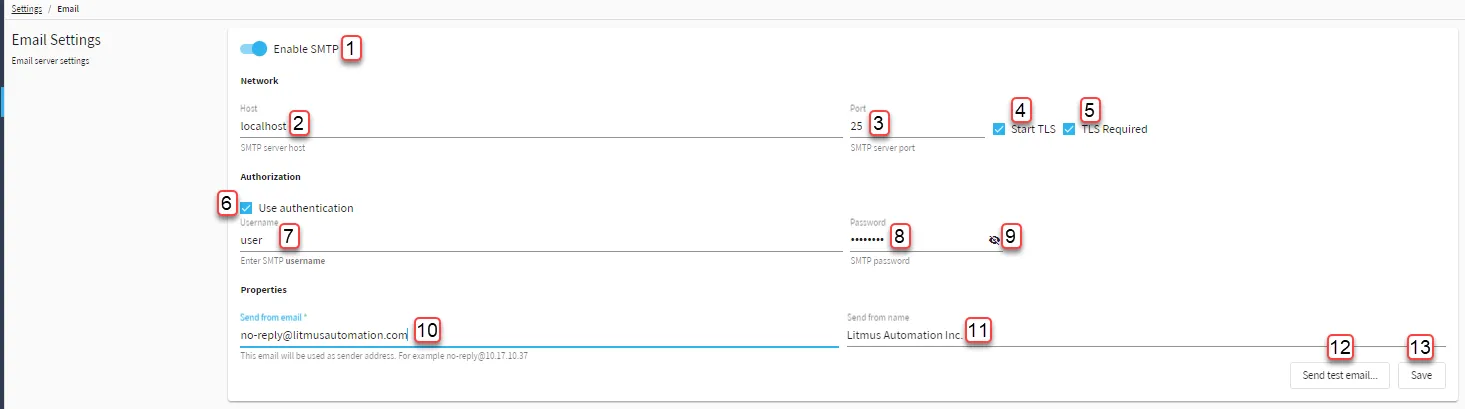
Email Settings section
[1] Enable SMTP: SMTP needs to be enabled to invite or add a project team member.
[2] Enter SMTP Server Host / IP address
Example: smtp:gmail.com
[3] Enter port number
Example: port 25 for plaintext or port 587 for encrypted
[4] Toggle Start TLS
[5] Toggle TLS Required
[6] Enable Use authentication
[7] (Use authentication-only) Enter Username
[8] (Use authentication-only) Enter Password
[9] View Password
[10] Enter Sender Email Address
[11] Enter Sender Email Name
[12] Send Test Email
[13] Save