Syslog
2 min
Note: The Syslog feature is available for Belden Horizon Data Manager 2.7.0 and later.
Belden Horizon Data Manager (BHDM) supports automatic log forwarding to an external Syslog server. All BHDM System Events (See System Events tab of Events) are automatically forwarded.
This enables you to collect the forwarded logs on the Syslog server for Security Information and Event Management (SIEM) systems.
Access Syslog UI
To access the Syslog UI:
- Log in to the Belden Horizon Data Manager Admin Console.
- From the Navigation panel, select Integration. Integration's Kafka pane by default appears.
- From Integration's navigation sub-panel, select Syslog. Integration's Syslog pane appears.
Refer to the following actions you can take on Belden Horizon Data Manager Admin Console's Syslog pane.
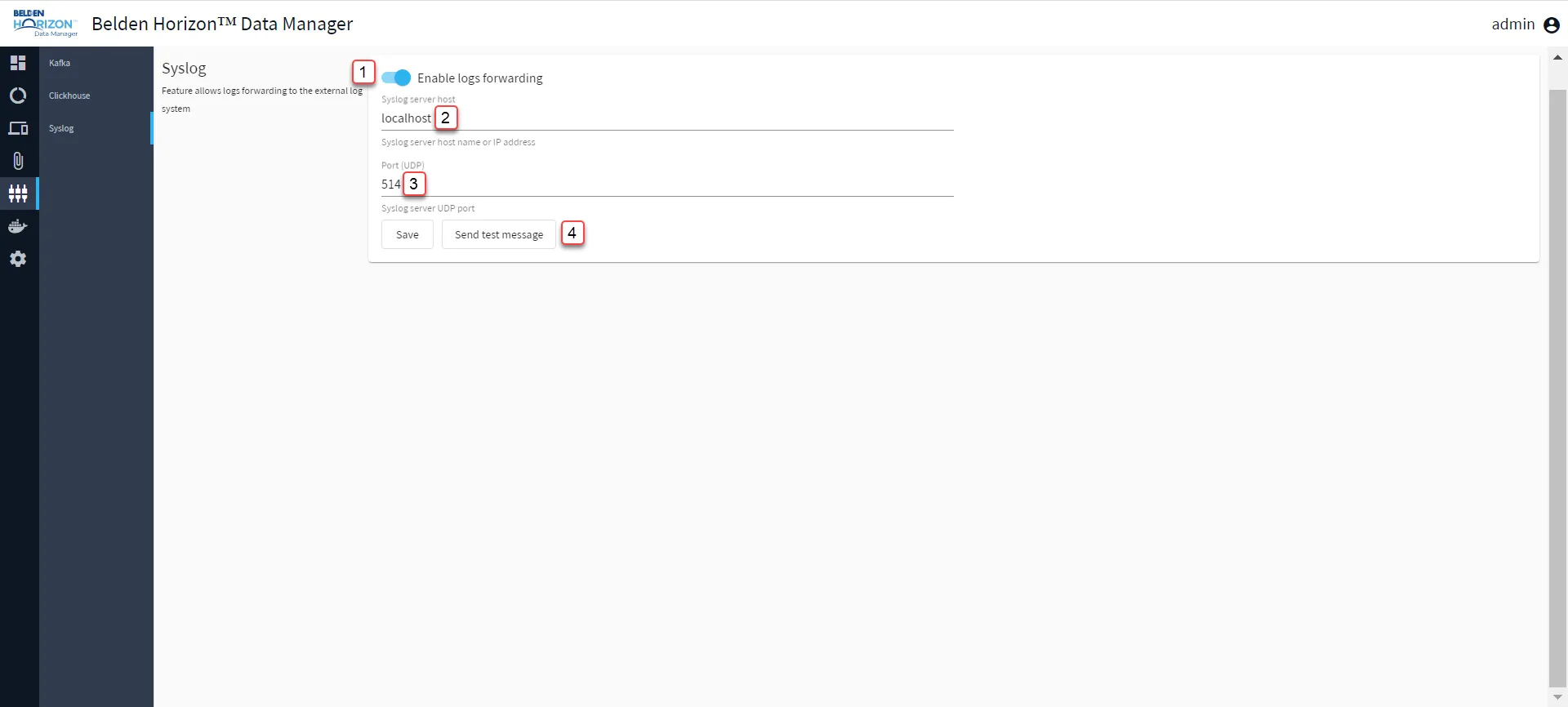
Belden Horizon Data Manager Admin Console : Syslog
[1] Enable/Disable logs forwarding
[2] Enter Syslog server host
[3] Enter Port(UDP)
[4] Send test message: The Syslog server will receive the test message.