Details
The Details tab includes device status, disk, memory, CPU, network interfaces, serial interfaces, modem interfaces, and CAN interface information for a selected edge device.
Tip: If data does not display:
- Check the device status from the Edge Devices pane to see if data is connected. See Step 6 of Edge Device Details
- Check the edge device information in Belden Horizon Data Operations.
Refer to the following actions you can take on the Belden Horizon Data Manager User UI's Edge Devices Details Details tab.
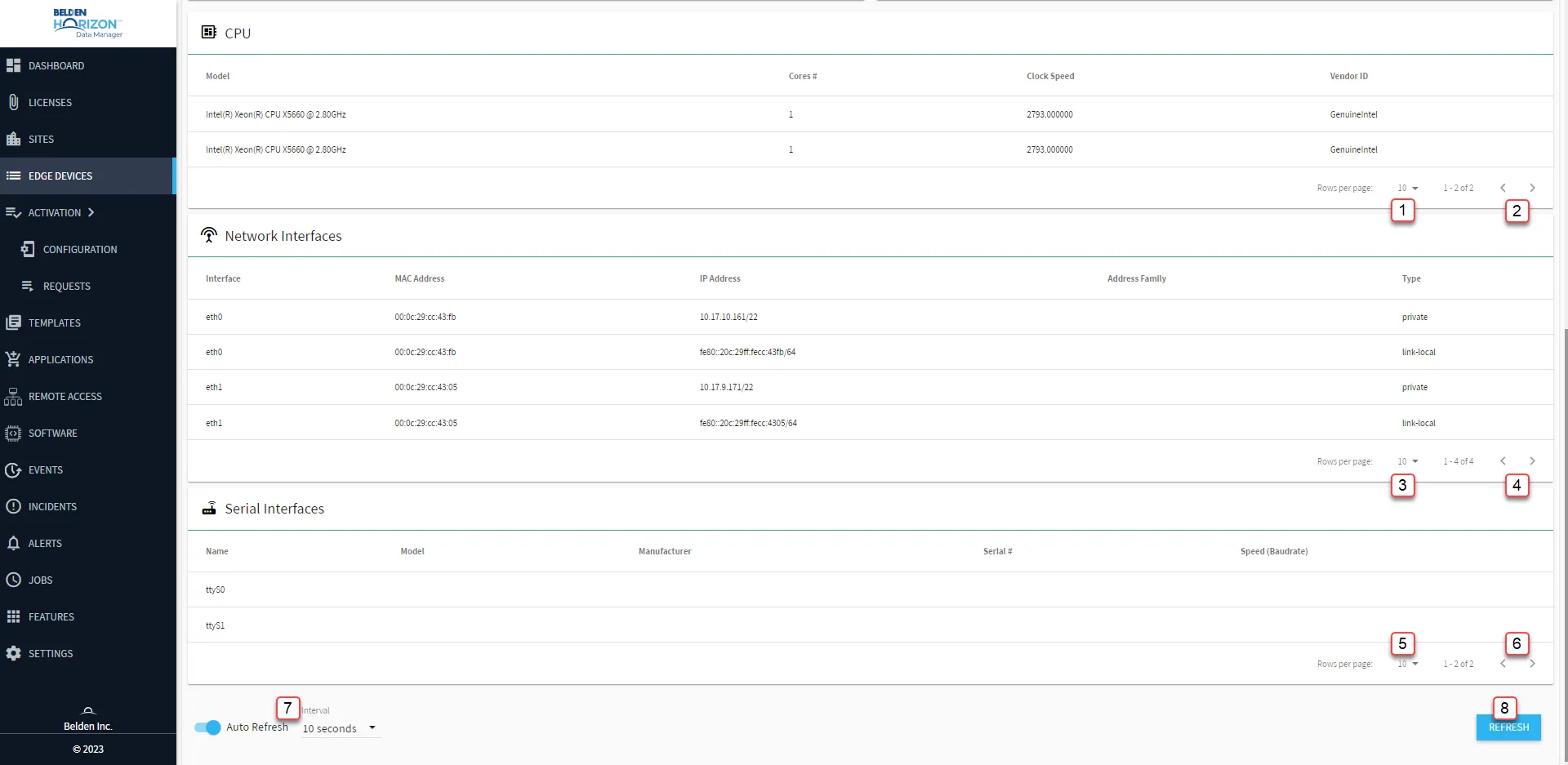
[1] Select Rows per page: 10, 50, 100
[2] Forward/Backward CPU
[3] Select Rows per page: 10, 50, 100
[4] Forward/Backward Network Interfaces
[5] Select Rows per page: 10, 50, 100
[6] Forward/Backward Serial Interfaces
[7] Auto-Refresh: every 5, 10, 30 and 60 seconds.
[8] Refresh
Edge Device Information
The following sections include information about the edge device:
For General, you can view:
For this label | You can view |
|---|---|
Model Number | The model number for the edge device. |
Manufacturer | The manufacturer of the edge device. |
Firmware Version | The current firmware version used for the edge device. |
Hardware Version | The hardware version used for the edge device. |
Serial # | The serial number for the edge device. |
For Status, you can view:
For this label | You can view |
|---|---|
Status / Activation | If the edge device online status is active or deactivated |
Control Client Address | The URL for the client |
Control Registration Date | The date and time the edge device was registered |
Control Last Update | The last date and time the edge device was updated |
Control Type | The type of control |
For Disk, you can view:
For this label | You can view |
|---|---|
Used Storage | The percentage of used storage for the edge device |
Available Storage | The percentage of available storage for the edge device |
Total Storage | The total storage for the edge device in KB |
Storage Used | The storage used for the edge device in KB |
Storage Available | The available storage for the edge device in KB |
For Memory, you can view:
For this label | You can view |
|---|---|
Used Memory | The percentage of used memory for the edge device |
Available Memory | The percentage of available memory for the edge device |
Total Memory | The total memory for the edge device in KB |
Used Memory | The used memory for the edge device in KB |
Available Memory | The available memory for the edge device in KB |
For CPU, you can view:
For this label | You can view |
|---|---|
Model | The model of CPU(s) used for the edge device |
Cores # | The number of cores for the CPU model |
Clock Speed | The clock speed of the CPU model |
Vendor ID | The vendor for the CPU model |
For Network Interfaces, you can view:
For this label | You can view |
|---|---|
Interface | Type of network interface. It can be an ethernet (eth0 or eth1), a Wi-Fi (wlan0), or an LTE (wwan0) network interface. |
MAC Address | Physical address of the network interface. |
IP Address | Logical address assigned by software to the network interface. |
Address Family | inet means that IPv4 traffic is run through the interface, while inet6 means that IPv6 is run through it. |
Type | Address space of the network. There are two types:
|
For Serial Interfaces, you can view:
For this label | You can view |
|---|---|
Name | The name of the device. |
Model | The model of the device. |
Manufacturer | The manufacturer of the device. |
Serial # | The serial number of the device |
Speed (Baudrate) | The communication speed of the device, in baudrate |
For Modem Interfaces, you can view:
For this label | You can view |
|---|---|
Status | The network area of the LTE modem. Home, for example, indicates that devices are all in close vicinity to the modem. |
Bars | The signal strength of the LTE modem. It ranges from zero to five. Zero means no signal, while five means a very strong signal. |
Network | The mobile network from which the modem communicates. |
IPv4 | The IPv4 address of the modem. |
IPv6 | The IPv6 address of the modem. |
IMEI | International Mobile Equipment Identity. A unique number that identifies mobile network devices. |
ICCID | Integrated Circuit Card Identifier. The SIM card serial number. |
APN | Access Point Name. Serves as a gateway for a mobile network to connect to another network or the public Internet. |
For CAN Interfaces, you can view and configure:
Note: The CAN Interfaces are configurable from this section.
For this label | You can view |
|---|---|
Interface | The name of the device. |
Set "open" | A check box that configures the selected device. |
Set "closed" | A check box that configures the selected device. |
Set "status reset" | A check box that configures the selected device. |
CAN Speed, Kbit/s | The high-speed baud rates from 40 Kbit/s to 1 Mbit/s, depending on cable length. |
UART Speed, baud | The maximum rate at which information is transferred. |
Note: Information about an edge device is available according to the type of device.