Cloud
This section covers cloud settings for Belden Horizon Data Manager Admin Console. Belden Horizon Data Manager stores updates, backups and some other data in a storage. There are two types of this storage that LEM utilizes: Local and Google Cloud Storage (GCS).
Cloud Credentials
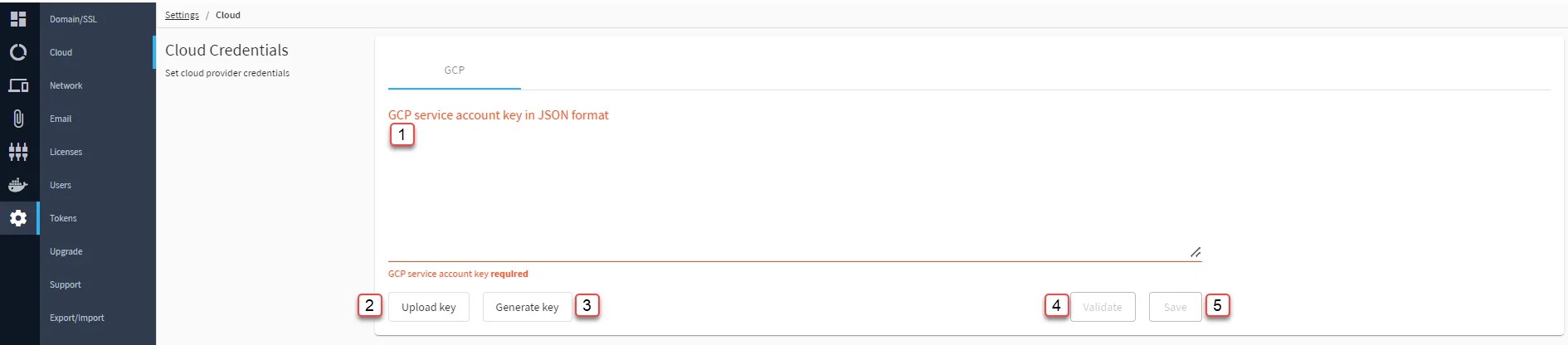
[1] Paste GCP service account key
[2] Upload key
[3] Generate key
When executing the bash commands, modify the copied text's variables as per your setup, specifically
- GCP_PROJECT_ID
- MC_SA_NAME
- SA_KEY_FILE_NAME
[4] Validate
[5] Save: Attempting to save will automatically perform a Validate.
Storage Settings
You can configure the storage setting to either use a local storage or use a Google Cloud Storage(GCS). A GCS Bucket Name is only needed for the Google Cloud Storage setting. A Bucket Name is the name of a folder in the Google Cloud Storage file system.
Note: The GCP account key field can be left empty if Storage Setting: Local is chosen.

[6] Select Storage Settings
[7] Enter Bucket Name: The value from the generated BUCKET_NAME below.
[8] Create bucket:
When executing the bash commands, modify the copied text's variables as per your setup, specifically:
- GCP_PROJECT_ID
- SA_NAME
- BUCKET_NAME
[9] Validate
[10] Save: Attempting to Save will automatically perform a Validate.