Users
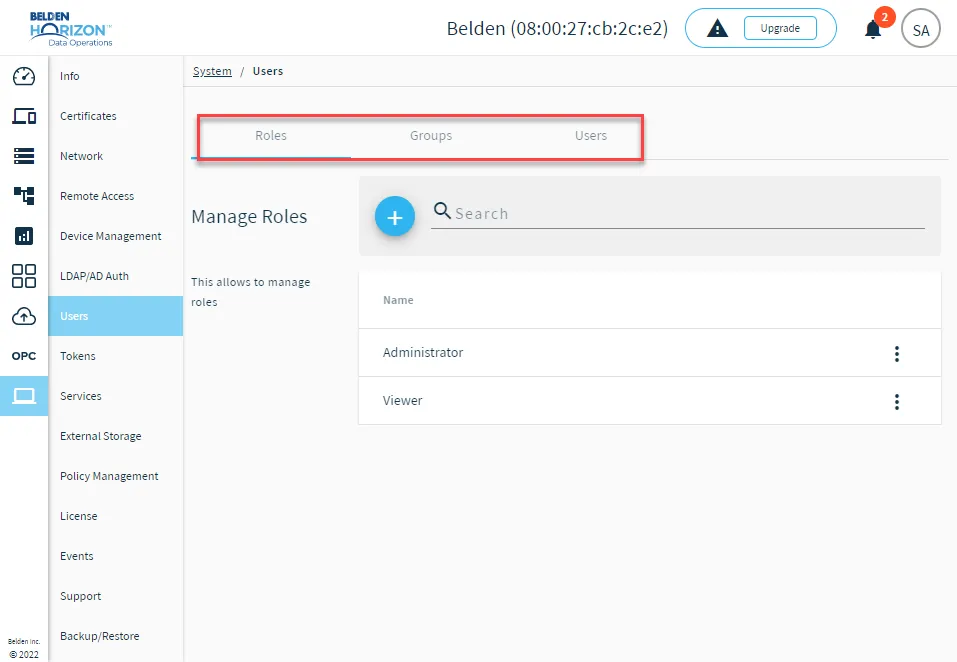
The Users pane enables you to add and manage permissions for your edge device's users.
Relationship of Roles, Groups, and Users
Note: Role-based access control (RBAC) is available for Belden Horizon Data Operations version 3.3.1 and later.
Belden Horizon Data Operations incorporates a Role-based access control (RBAC) to customize user permission settings in the form of three distinct components.
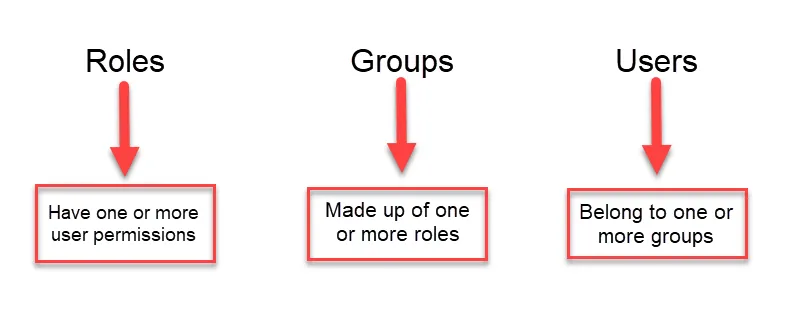
- Roles: Each role has a collection of customizable permissions. Roles are added to groups and determine the permissions groups have. See Role Permissions for details.
- Groups: A group is made up of one or more roles. The roles in a group determine the permissions for the group.
- Users: Accounts that will be assigned to groups. The one or more groups a user is assigned to determines the roles and permissions the user has.
Working together, a Role determines the permission settings a Group will have. A Group will contain one or more roles that determines its permissions. A User will be assigned to a Group where it will have access to Belden Horizon Data Operations based on the the Group's one or more Roles.
Important: The following properties should be kept in mind when adding/editing Roles/Groups/Users.
- A group can receive more than one role (and their respective permission settings) to a resource.
- A user can be assigned to multiple groups.
- If a user is not assigned to at least one group, they will not be able to log in to Belden Horizon Data Operations.
- In the case of conflicting permission settings: As long as there is at least one role or group with permissions to a resource, regardless of how many other roles/groups that don't have it, users will receive that resource.
Default Roles, Groups, and Users
By default, the following user management items are provisioned that can't be deleted.
Roles
- Administrator
- Viewer
Groups
- Administrators
- Viewers
User
- admin
The system ensures that at least one user has the appropriate administrative permissions to manage roles, groups, and users.
Default User Permissions
By default, every user has the permission to accept the Belden Horizon Data Operations end-user license (EULA) when logging in the first time. Users can also access their user profile to view their current user permissions and change their password. See Manage Your User Profile for details.
Every user also has the View permission for the following components when navigating to the System module in Belden Horizon Data Operations.
- Info
- Certificates
- Network
- Remote Access
- Device Management
- Services
- External Storage
- Policy Management
- License
- Support
Learn more about Role Permissions.
Backup Files and Templates
All role, group, and user configurations are included in backup files. See Backup/Restore and Backup File Contents and File Management for more information.
In template files, only authentication providers are included in template configurations. If you apply a template to a new edge device, you will need to map LDAP groups manually. See Manage LDAP Providers for more information.
Legacy User Migration
For Belden Horizon Data Operations instances on version 3.2 and earlier, there were three possible roles: Observer, Developer, and Administrator. When you upgrade to version 3.3 or later:
- Any Administrator role is automatically provisioned to the Administrators group with the group's respective permissions.
- Observer and Developer roles are automatically provisioned to the Viewers group with the group's respective permissions.
Access Users UI
Note: You must have the appropriate permissions to manage roles, groups, and users. By default, the first user (admin user) provisioned in Belden Horizon Data Operations has these user permissions.
To access the Users UI:
- Log in to Belden Horizon Data Operations.