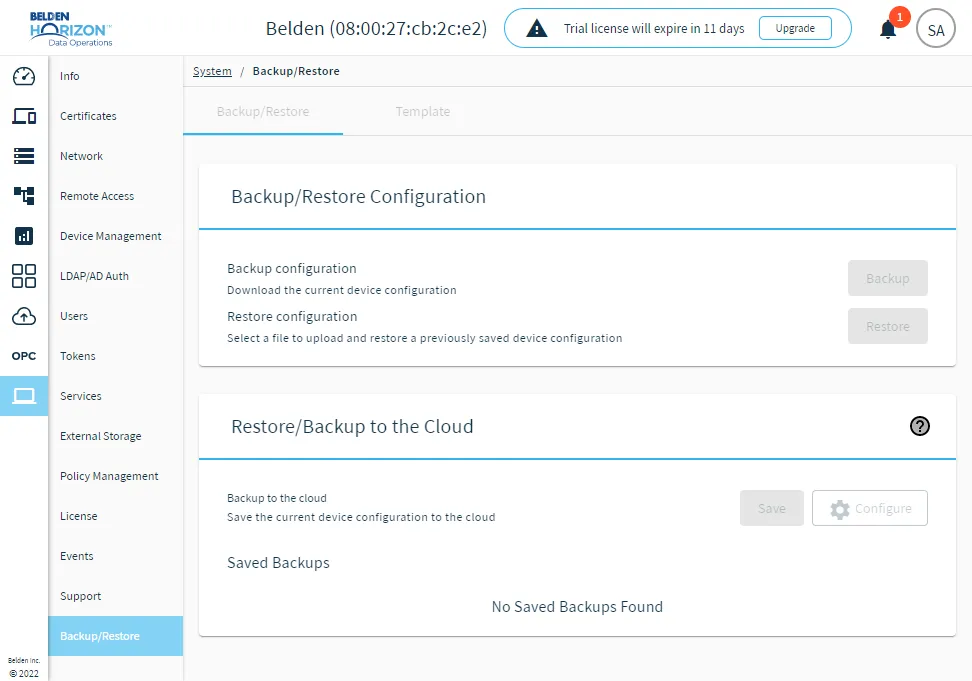
Backup/Restore
The Backup/Restore pane allows you to do the following:
- Configure and initiate system backups and restore operations. To prepare for possible hardware failures, Belden Horizon Data Operations provides a disaster recovery plan to support device replacement.
- Create detailed, granular backup templates and exchange these templates between edge devices as JSON files.
Backup/Restore Tab
Important:
- Backup/restore operations are not intended for replication of configurations. These operations will fail when attempted.
- If you create a backup on an instance of Belden Horizon Data Operations running on a virtual machine, you can't use the same backup to restore an instance of Belden Horizon Data Operations running on a physical device.
Belden Horizon Data Operations offers a backup option which consists of generating a backup file with a list of configuration settings that can be applied to the same device or a new device.
You can use Backup and Restore in the following ways:
- From the Belden Horizon Data Operations UI
- From Belden Horizon Data Manager
An alternative non-Belden Horizon Data Operations backup option is also available, see Image Backup for more details.
The following use cases are supported:
- Set up a newly installed Belden Horizon Data Operations device with a different device’s configuration.
- A user deleted or overwrote a portion of the configuration and wants to reset to a last-known good configuration.
- Device hardware fails and the device must be replaced with another one. See Replace a Damaged Device.
Template Tab
The Template tab allows you to select configurations available for the Belden Horizon Data Operations device and download them to a JSON file, thereby creating an edge device configuration template, which can be used for replication of Belden Horizon Data Operations configurations.
To review what configurations are included in a template file, see Manage Templates.
You can create multiple versions of edge device configuration files. You can then upload the template file to another edge device. A successful upload applies the configuration to that device.
You can also apply templates to Belden Horizon Data Operations using Belden Horizon Data Manager, potentially changing the configurations for hundreds of edge devices.
For more information about templates, see Templates.
How Backup Works
Upon a backup operation, Belden Horizon Data Operations create a snapshot of a predetermined list of configuration settings (specified in Backup File Contents and File Management) and stores it into a .DAT file.
How Restore Works
Upon a restore operation, the Belden Horizon Data Operations is temporarily set into a blank state. Then it retrieves all the configuration settings stored in the .DAT file and applies all the settings into the Belden Horizon Data Operations instance appropriately. The Belden Horizon Data Operations instance is then automatically rebooted.
Choose Between Backup/Restore or Download/Upload Template
| Backup and Restore | Download/Upload Template |
|---|---|---|
Purpose | Restore a hardware-damaged Belden Horizon Data Operations Device | Clone a Belden Horizon Data Operations Device to other devices |
Customizability | Cannot be customized and contains a predetermined list of configuration settings. | Can be customized to contain a list of selectable configuration settings. |
Files Generated/Used | .DAT file | .json file |
Operation | Replicate and overwrite the Belden Horizon Data Operations device's system state from the backup (.DAT) file | Append (and not overwrite) its configurations settings to the Belden Horizon Data Operations device. |
Access Backup/Restore UI
To access the Backup/Restore pane:
- Log in to Belden Horizon Data Operations.
- From the Navigation panel, navigate to System > Backup/Restore. The Backup/Restore pane appears.