Management
3 min
Belden Horizon Data Operations OPC UA supports many different options for managing security policies and user authentication.
The OPC UA Management pane includes the following sections:
- OPC UA Management: Allows you to start, reset, stop, and configure the server. The OPC UA server is color-coded. A started server displays a green OK. A stopped server displays a red Stopped. Configure allows you to set the host, port, and allow nodes under root.
- Policy Management: Allows you to enable different encryption algorithms and security modes for the OPC UA server.
- Authentication Management: Allows you to enable multiple identity types and choose security policies.
- User Management: Allows you to manage OPC UA users.
Access OPC UA Management UI
To access the OPC UA Management pane:
- Log in to Belden Horizon Data Operations.
- From the Navigation panel, navigate to OPC > Management. The Management pane appears.
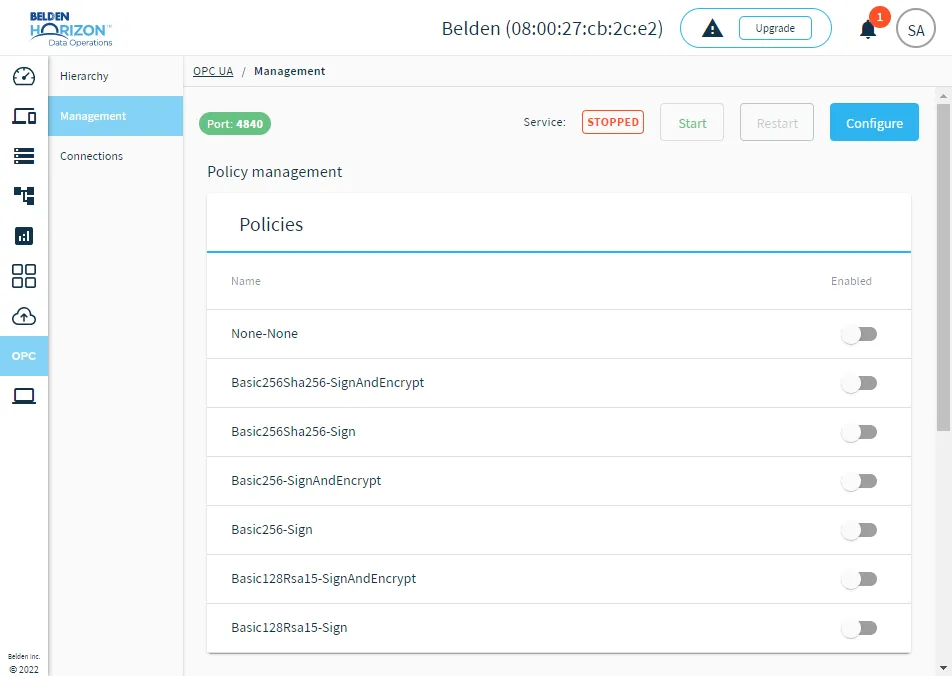
The OPC UA Management pane