Manage OPC UA Authentication
2 min
You can configure authentication options for the OPC UA server by navigating to OPC > Management.
OPC UA server supports the following identity tokens for authentication:
- Anonymous: The server does not have user information and cannot identify them.
- Certificate: The server can identify users by security certificates generated by hash algorithms.
- Password: The server can identify users by their password.
You can enable multiple identity types and choose authentication options for them.
Important:
- Choosing security policies for identity tokens ensures that the server encrypts authentication messages.
- Selections in the Authentication Management section must match the selections in the Policies section or the server will not start.
Select Security Policies
To select security policies:
- Navigate to OPC > Management.
From the Management panel, refer to the Authentication management section and click the Enable toggle next to one or more identity tokens: Anonymous, Certificate, and Password.
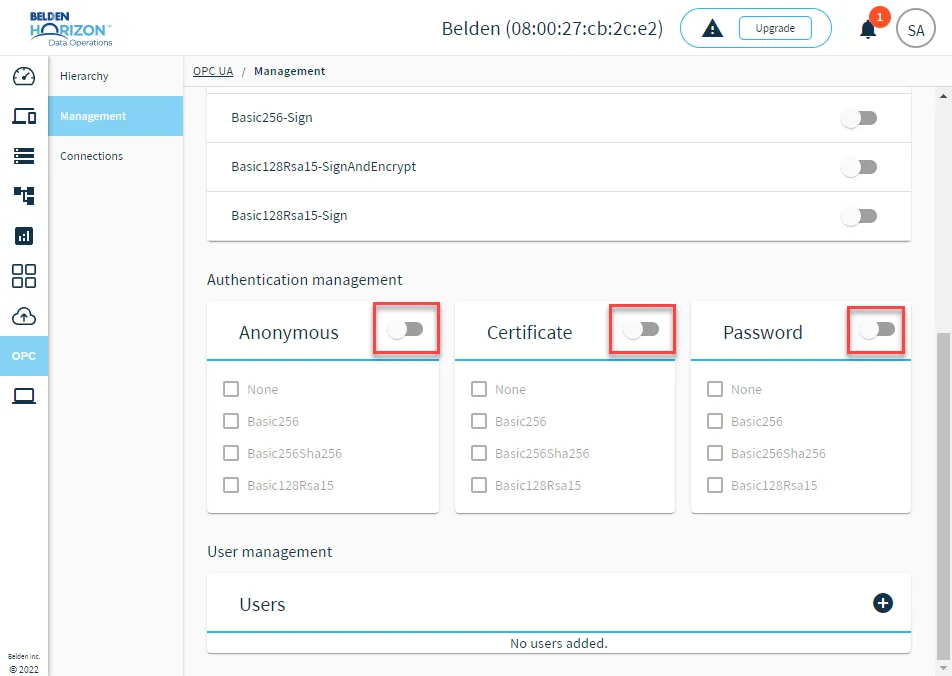 The Authentication management section
- For each enabled token section, select check boxes for authentication options.
- After enabling or disabling a policy, you must restart the OPC UA Server. See Manage the OPC UA Server to learn more.