Manage the OPC UA Server
1 min
You can manage the OPC UA Server by navigating to OPC > Management.
Refer to the following OPC UA Server management options.
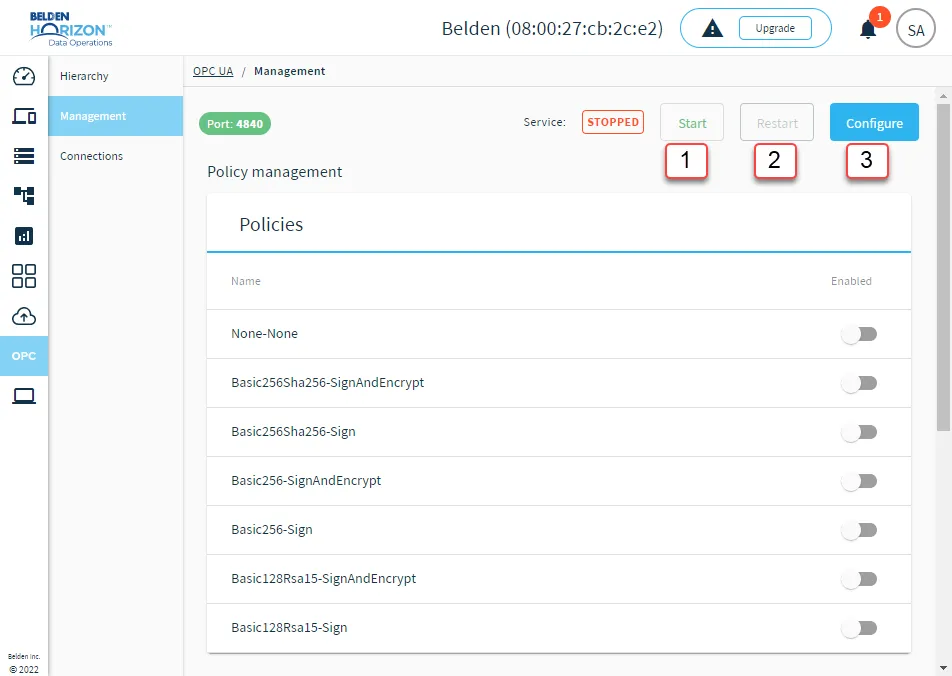
OPC UA Server management options
[1] Start and Stop OPC UA Server: Before you start the OPC UA Server, make sure you do the following:
- Configure the OPC UA Server. Refer to the callout below for more information.
- Enable at least one OPC UA policy.
- Configure OPC UA authentication.
After starting the OPC UA Server, you have the option of stopping it.
[2] Restart OPC UA Server: Restarting the server returns it to its original configuration.
[3] Configure OPC UA Server: To configure the OPC UA Server, enter the details for the server:
- Host: Enter the OPC UA host IP address.
- Port: Enter the port number 4840.
- Allow Nodes Under Root: You have the option of selecting the check box.