Licenses
Belden Horizon Data Operations supports two types of licenses.
- Node-locked license: Each license is locked to an edge device.
- Site license: Activated with a license server embedded in Belden Horizon Data Manager. During the edge device activation, this server can provision a site license, which offers an unlimited usage of devices (except for configurable tag limits and reservations). You can define the limit (upper limit) and reservation (lower limit) of assets, such as tags, per site license.
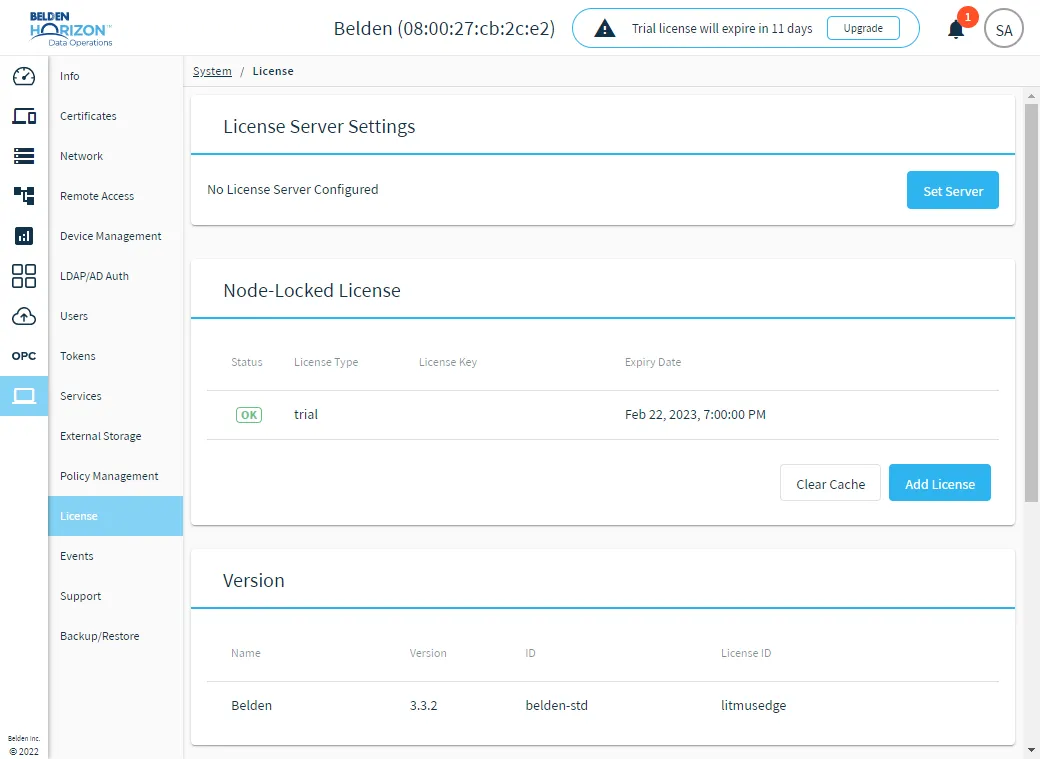
The License pane includes the following sections.
- License Server Settings: Allows you to configure License server settings.
- Node-Locked License: Allows you to add a standard node-locked license to replace the trial license, upgrade a license, add additional licenses to increase the number of devices and tags, or add new modules, as well as to remove licenses. By default Belden Horizon Data Operations comes with a 15-day node-locked trial license. All features are available with a trial license except backup/restore and template.
- Version: Allows you to view the current Belden Horizon Data Operations version and License ID.
- Features: Allows you to view the currently installed modules, as well as view and configure the number of devices and tags allowed under your license for site license.
Note: Backup/Restore are not available under the trial license.
Contact your Belden representative to request a license key.
Node-Locked License
A standard node-locked license is valid for one year. The license type, license key, and expiration date are visible from System > License. The license key is 16 digits, for example: 2411-3629-5461-7935. You must include all the dashes in the license. Multiple licenses can be purchased, added, and activated to increase the number of device and tags or for products in addition to the standard core license.
When a standard core license expires, you cannot access any modules except the license section in System. Furthermore, the expired license could use up the CPU, thereby unnecessarily wasting computing resources. A banner appears in System > License that lets you know which license has expired. You must contact your admin to add a new license. Expiration dates apply to core and additional licenses.
You can upgrade an existing core license to replace it.
Notes:
- For a standard core license, see Activate a License Offline to learn how to activate a license without being connected to the internet.
- A license can be upgraded but not deactivated.
- A license can be used on the same edge device (same Host ID) any number of times as long as it is within the valid date of expiration.
Belden Horizon Data Operations does not require Ethernet or an internet connection during installation. The installation works completely offline. However, Ethernet (not internet) is required during the first bootup after the installation is complete.
Important for Cloud Deployment:
Before activating the license, ensure all hardware / VM configuration steps that can modify the MAC address (add/replace a Network Interface Controller (NIC) card) are finalized.
The license Host ID depends on the Media Access Control (MAC) address for the device. The MAC
address identifies the devices on a network. Changing the MAC address will invalidate the license.
Access License UI
To access the License pane:
- Log in to Belden Horizon Data Operations.
- From the Navigation panel, navigate to System > License. The License pane appears.