Device Management
3 min
From the Device Management pane, you can activate your edge device for the selected Belden Horizon Data Manager, which enables Belden Horizon Data Manager to manage that edge device. You can also deactivate from the previously connected Belden Horizon Data Manager.
The Device Management pane includes the following sections:
- Cloud Activation: Allows you to connect (activate) or disconnect (deactivate) your edge device using an endpoint IP address. You can view the company name, project name, device ID and status of the device. The endpoint is set or modified here.
- Manage: Allows you to reboot and factory-reset your edge device, as well as upload the edge device software.
Cloud activation accomplishes the following:
- Creates a connection to communicate with Belden Horizon Data Manager.
- Create a default SSL connector in Integration.
- Adds a Custom CA certificate for Belden Horizon Data Manager.
- Configures a Belden Horizon Data Operations so that users can have remote access from anywhere in the world.
Access Device Management UI
To access the Device Management pane:
- Log in to Belden Horizon Data Operations.
- From the Navigation panel, navigate to System > Device Management. The Device Management pane appears.
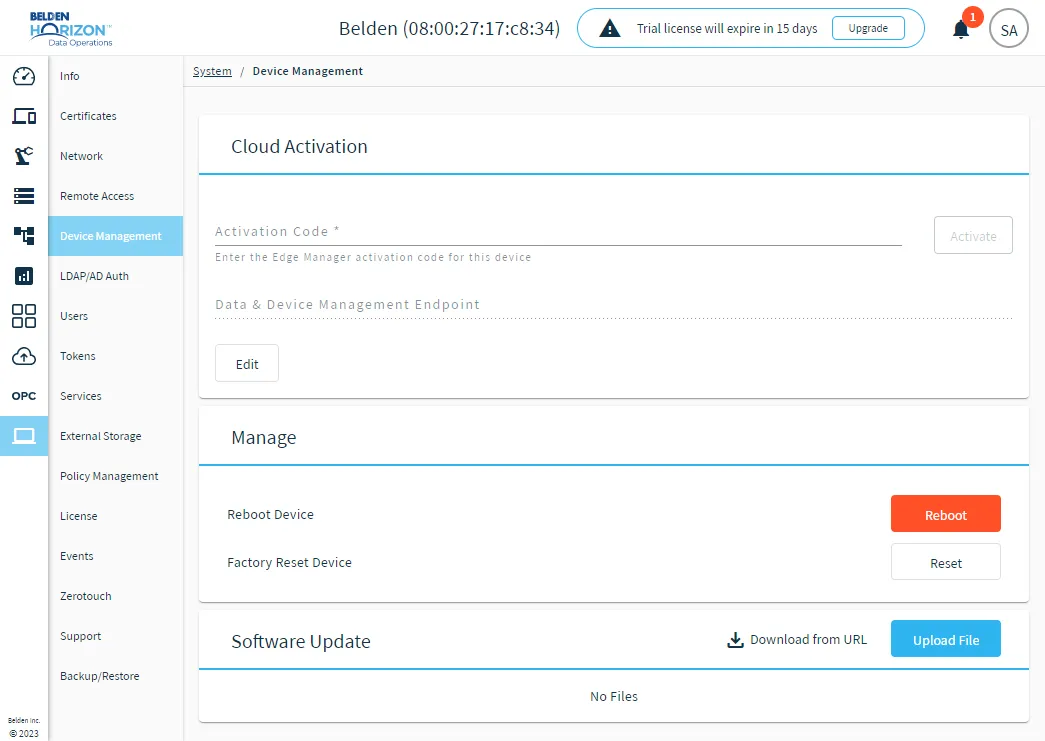
The System Device Management pane