Test a Provider
5 min
You can test an LDAP provider from the Authentication Providers list or the Configuration Update Provider dialog box by navigating to System > LDAP/AD Auth.
Tests include:
- Connection status
- Groups status, count, and details
- Users status, count, and details
Important: To receive meaningful test results, the LDAP server must be connected to the network.
Test an LDAP Provider
To test an LDAP provider:
- Navigate to System > LDAP/AD Auth. The Authentication Providers pane appears.
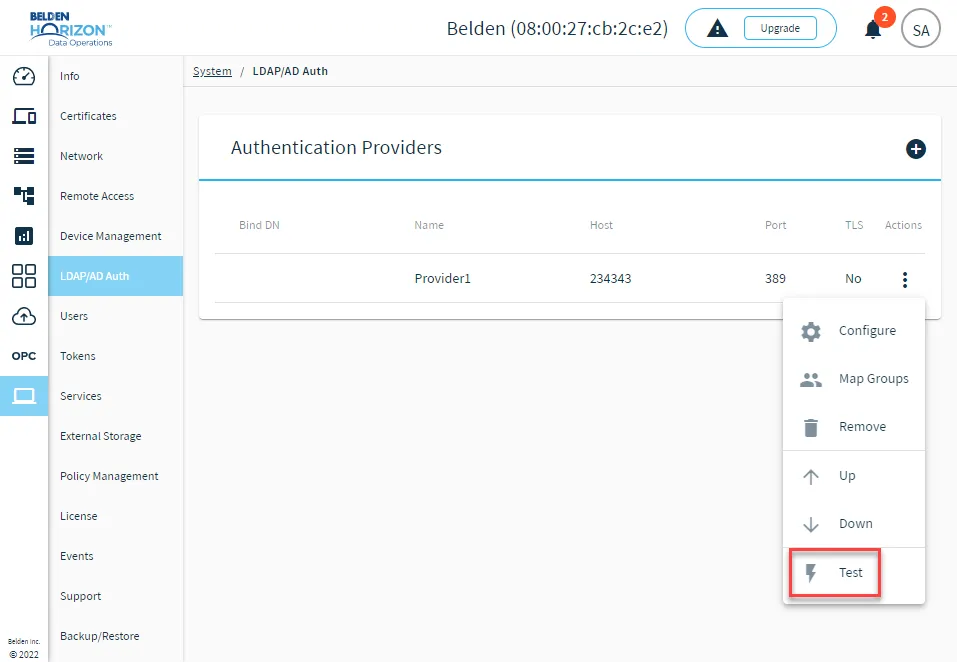
The test function for authentication providers
View Groups and Users details
You can view information on Groups and Users from the Provider Test Result dialog box. To view the information, click the Info icon in the Groups or Users section. The details for the users or groups configured on the LDAP server drop down.
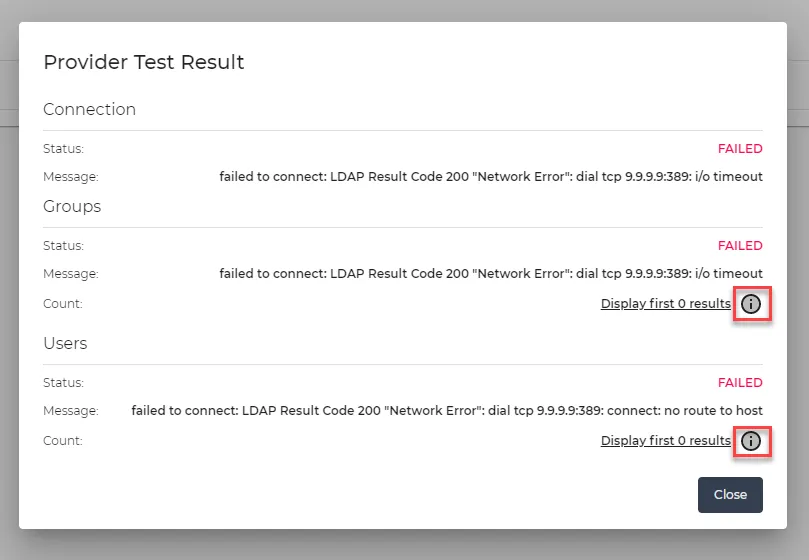
The Provider Test Result dialog box
Details for Groups include (for each listed group):
- DN
- Group ID
- Group Name
- Users DN, Group ID and Group Name
Details for Users include (for each listed user):
- DN
- Group ID
- First Name
- Last Name
Test an LDAP Provider Configuration
To test an LDAP provider configuration:
- Click Test. The Update Provider dialog box changes to include test results for the selected provider.